Special Offer: US$59 | Lifetime Access to the Complete Package

Living Soil Shortcut · Soil & Compost Toolkit
Soil Regeneration
Made Simpler.
A practical mobile app + a complete course to make better compost and understand your soil.
Plan compost mixes, track your pile and record soil observations. Then use 28 short, focused video lessons to understand what your results mean and what to do next.
Stop spending on guesswork.Before you buy another soil amendment or start another compost pile, know what you’re trying to change — and how to check whether it’s working.
One payment · App + complete course + desktop tools · Lifetime access to all

BIOFARMLAB · WORKING WITH GROWERS EVERY DAY
growers helped
Build better, more profitable regenerative farms.
Gardeners & farmers
We help growers assess soil, make biologically complete compost and plan regeneration.
Farm + certified lab
We test soil and compost biology in our Soil Food Web laboratory and put the methods to work on our own regenerative farm. Filip completed Dr Elaine Ingham’s Soil Food Web School programme, which forms the foundation of our approach.
Machines across Europe
We design and build regenerative machinery for working farms.
Short lessons.
Practical knowledge.
A clear next step.
Explore living soil with Filip: microscopy, simple soil tests and composting, from a backyard bin to farm-scale piles.
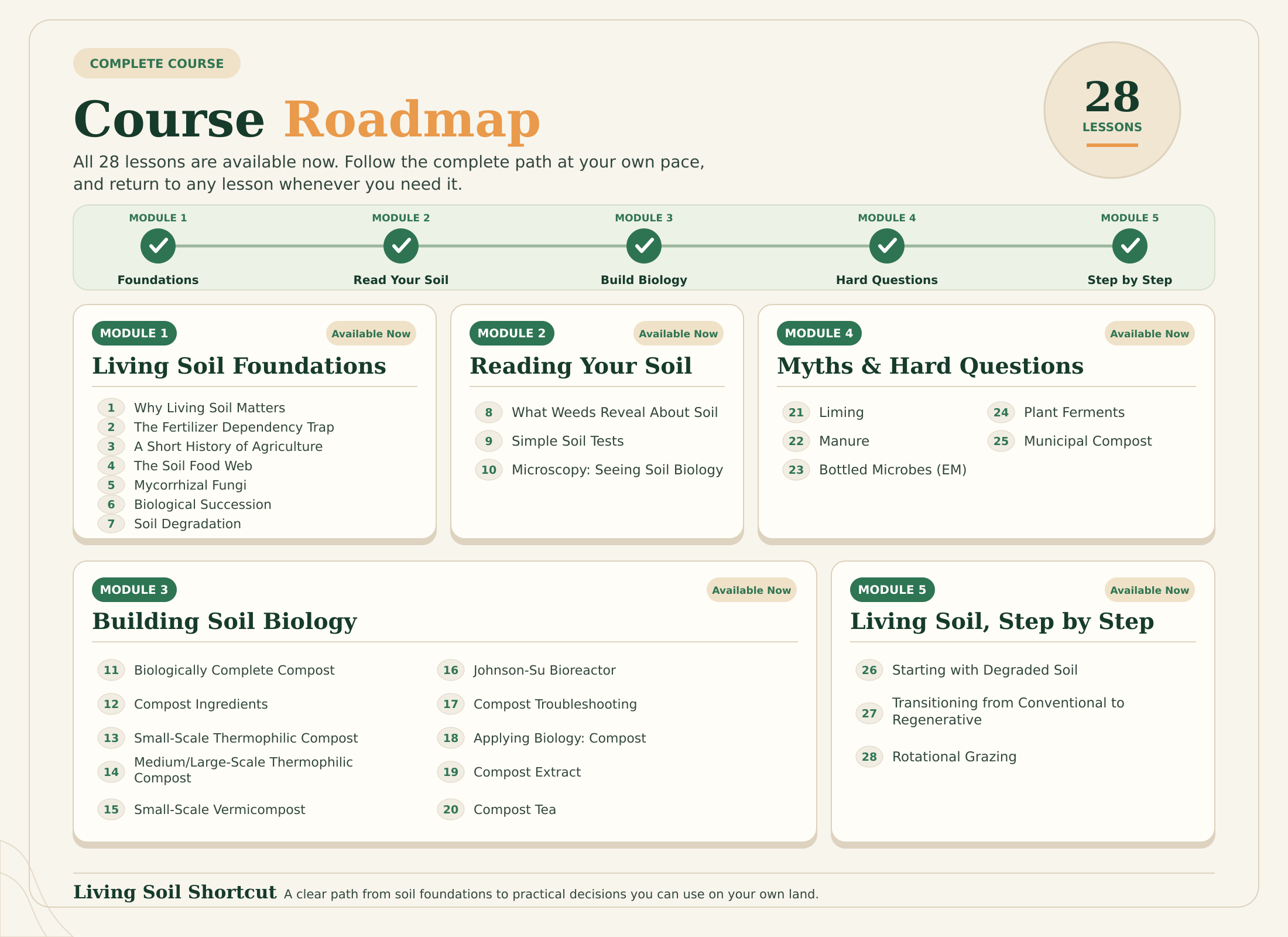
The full course brings soil biology, compost and regeneration together in 28 short, information-packed videos. Watch in order, or return to the topic you need. The same 28 lessons are also available in the mobile app, and your course platform access works on a computer.
What’s inside the 28 lessons
From soil biology and simple tests to compost methods and a plan for your land.
01Living Soil FoundationsHow soil biology works — including the Soil Food Web, mycorrhiza and degradation.7 lessons
- Why Living Soil Matters
- The Fertilizer Dependency Trap
- A Short History of Agriculture
- The Soil Food Web
- Mycorrhizal Fungi
- Biological Succession
- Soil Degradation
02Reading Your SoilRead clues in your soil with weeds, simple tests and microscopy.3 lessons
- What Weeds Reveal About Soil
- Simple Soil Tests
- Microscopy: Seeing Soil Biology
03Building Soil BiologyCompost methods, extracts, teas and what to do when a pile goes wrong.10 lessons
- Biologically Complete Compost
- Compost Ingredients
- Small-Scale Thermophilic Compost
- Medium/Large-Scale Thermophilic Compost
- Small-Scale Vermicompost
- Johnson-Su Bioreactor
- Compost Troubleshooting
- Applying Biology: Compost
- Compost Extract
- Compost Tea
04Myths & Hard QuestionsLiming, manure, bottled microbes and other common recommendations examined.5 lessons
- Liming
- Manure
- Bottled Microbes (EM)
- Plant Ferments
- Municipal Compost
05Living Soil, Step by StepA starting path for degraded soil, conventional fields and grazing land.3 lessons
- Starting with Degraded Soil
- Transitioning from Conventional to Regenerative
- Rotational Grazing
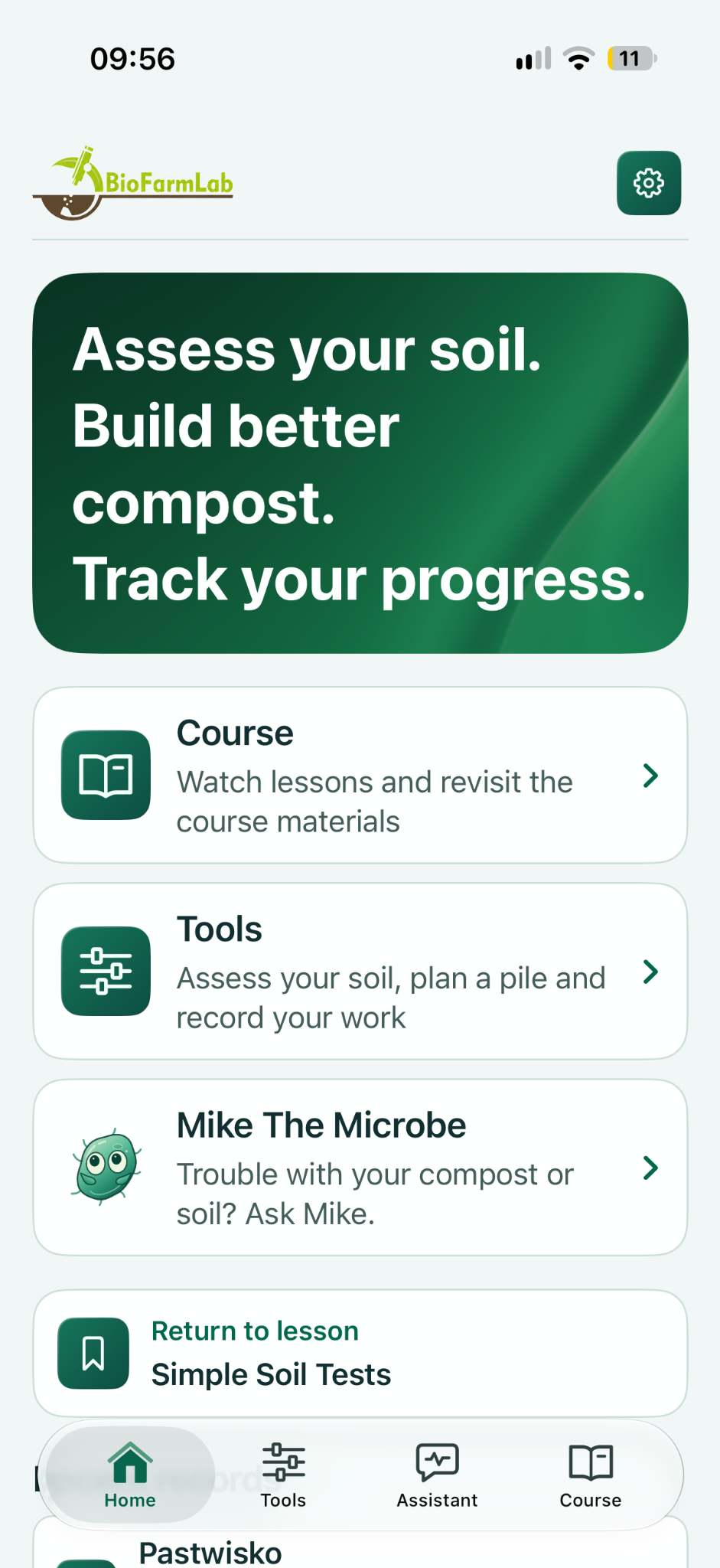
INSIDE THE APP
See your soil.
Plan your compost.
Follow your progress.
The 28 lessons live in the app alongside Soil Radar, the compost tools, the soil regeneration journal and Mike the Microbe, your in-app troubleshooting assistant. When a tool points you to a relevant lesson, open it right there.
Soil RadarRecord observations and compare your plot over time.What changed after your last application? Compare the observations.
Compost CalculatorBuild a recipe with the materials you have.Grass, leaves, manure: plan the mix before you build the pile.
Compost LogKeep temperature, moisture and pile history together.A pile stops heating. Check its history, then use the troubleshooting lesson.
Your soil, at a glance.
Soil Radar · a saved plot with real observations

Start with your own pile.
Compost Calculator · pile planning in the app

THE CHOICE IS YOURS
Skip the years of guesswork
The Long Way
Hours of scattered YouTube videos
Expensive courses that go far deeper than most growers need
Conflicting advice about compost, extracts, teas, and amendments
Getting lost in ratios, recipes and terminology
The Living Soil Shortcut
The key biology explained simply — with practical steps tested on our farm, in our lab and on our students’ farms
Compost, extract or compost tea? Learn how they differ, how to prepare them and when to use each — so you can choose your next step for healthier soil.
Ready-to-use app tools and Mike’s troubleshooting, plus editable Google Sheets and guides for your computer
A compact, step-by-step course you can actually finish and apply


STUDENT SUCCESS
What Growers Are Saying
★★★★★
“Congratulations on the course — truly. I bought it myself, and I already know I’ll be coming back to the material when I have a quiet moment. I also shared it on my Instagram and recommended it, hoping it reaches many more people.”
— Agnes
★★★★★
“Filip’s course was absolutely worth buying. I’m really happy with it — there is a huge amount of information, and everything is explained clearly and thoroughly in the videos. Highly recommended.”
— Thomas
★★★★★
“I studied topics like this at university because I had to pass exams. Now I’m coming back to this knowledge because I actually want to understand it and use it. I’ve had the course for only three days, and I already know it was worth it. I definitely recommend it.”
— Course participant
Enroll now
App + Complete Course
Special Offer:
$59 USD
Regular Price: $149
Lifetime Access
SELF-GUIDED
All prices in USD.
28 short, practical video lessons — in the app and on the course platform
Soil Radar and Soil Regeneration Journal
Compost Calculator, Compost Log and Mike’s troubleshooting help
Compost Recipe Cheatsheet
Compost Troubleshooting Guide
Compost Pile Log Sheet
Lifetime access to the full package, including future app updates
Mobile app — the complete course, tools and Mike in one place
Editable Google Sheets are included for your computer. The complete package is yours with one payment, with lifetime access to everything. App available for iPhone, iPad and Android.
Answers For Growers
Practical answers for gardeners, homesteaders and farmers: what is included, how to use the tools, and how access works.
Your course is hosted on Content Creator Machine, a US-based platform.
FAQ
Q1: Who is Living Soil Shortcut for?
Living Soil Shortcut is for gardeners, homesteaders and farmers who want to understand their soil and make better compost. If you are starting out, the 28 short video lessons explain the foundations step by step. If you already grow or compost, use the course and app to review your methods, record observations and plan your next steps. The examples cover raised beds, gardens and farm-scale compost piles.
Q2: What can I do with the mobile app?
The app includes the complete 28-lesson course, Soil Radar, Soil Regeneration Journal, Compost Calculator and Compost Log. Mike the Microbe helps with soil and compost troubleshooting, and tools can point you to a relevant short lesson. The course is also available on the learning platform, and editable Google Sheets are included for your computer.
Q3: What is included in the US$59 package, and how long do I have access?
One US$59 payment includes the complete 28-lesson course in the mobile app and on the learning platform, the app’s tools and Mike’s troubleshooting help, PDF guides and editable Google Sheets for your computer. Your purchase gives you the complete package with lifetime access to the course, app and desktop tools. Updates and new features we add to the Living Soil Shortcut app are included too.
Q4: Can I use the course with sandy, clay or compacted soil?
Yes. The course shows you how to observe soil structure, water movement and signs of biological activity, then use those observations to plan your next steps. Soil Radar helps you keep a record and compare changes over time. The lessons cover compost, compost extracts and compost teas, including preparation and application. Results depend on your soil, climate and management; the tools support observation and planning rather than replacing a laboratory soil test.
Q5: Is there a money-back guarantee?
Yes. Explore the course with our 14-day refund guarantee. If you complete less than 20% of the course and decide this package isn’t right for you, email [email protected]
Q6: Do I need the app or Google Sheets to follow the course?
You can watch all 28 lessons on the course platform and use the PDF guides on your computer without installing the app. The same lessons, Soil Radar, Soil Regeneration Journal, Compost Calculator, Compost Log and Mike’s troubleshooting help are also in the iOS and Android app. Editable Google Sheets are included for growers who prefer working on a computer. All of these are included in the one-time price.

© Copyright 2026. BioFarmLab. All rights reserved.
Android is a trademark of Google LLC.